Unity is not the entry fee for augmented reality.
No-code AR means building the experience in a visual editor instead of a game engine: you upload a photo of the printed thing, drag video, images and text onto it, and publish. The print becomes its own tracking marker, the viewer opens a link in their phone browser with nothing to install, and there is no C#, no build pipeline and no app review anywhere in it.
Start with what your audience will hold or see.
Build a short reveal around the print, then test the invitation and camera journey under the conditions your audience will use.
Show a piece of your work without hiding ordinary contact information. Test whether the card carries enough visual detail to track at its final size.
Connect the printed artwork to a demonstration or story. Check curved surfaces, reflections and the space the camera needs before a packaging run.
Plan an event campaign, an AR business card or AR packaging. For a simple video destination, compare AR with a direct video link.
The real cost is not the license fee.
Unity is a game engine; Blender makes 3D assets. A visual AR editor serves a narrower job: arranging content over a print and publishing it without building an app.
| Unity + AR Foundation | Blender | Interart | |
|---|---|---|---|
| What you install | The editor, an SDK, platform build tools | Blender — then still an engine to ship it in | Nothing. It runs in the browser |
| What the viewer installs | Your app, from a store | — | Nothing. It opens in their phone browser |
| Skills assumed | C#, scene graphs, build pipelines, store review | Modeling, UVs, materials, export formats | Drag and drop |
| What you build | A custom application | Assets for an experience | A hosted AR composition |
| Who hosts and serves it | You do | — | We do. One link and one QR code per design |
| Changing it after the print run | Depends on how the app loads its content | — | Choose to update the existing published link, then retest the printed code |
| Cost to find out | Free engine, paid developer time | Free, plus the same | Free — 3 published designs, 100 scans a month, commercial use included |
Photo in, QR code out.
-
1
Upload a photo of the printed thing
The packaging, the flyer, the card, the poster. Its own artwork becomes the marker, so nothing is printed on it that was not already in the design.
-
2
Drag the layers on
Video, images, text and 3D, positioned on a canvas — including past the edges of the piece, so things can float around it or sink behind it.
-
3
Publish and print the code beside it
You get one link and one QR code. Anyone who scans it points their phone at the printed piece and the layers play locked to it, in the browser they already have.
Longer walkthroughs, by artifact: an AR poster · an AR trading card.
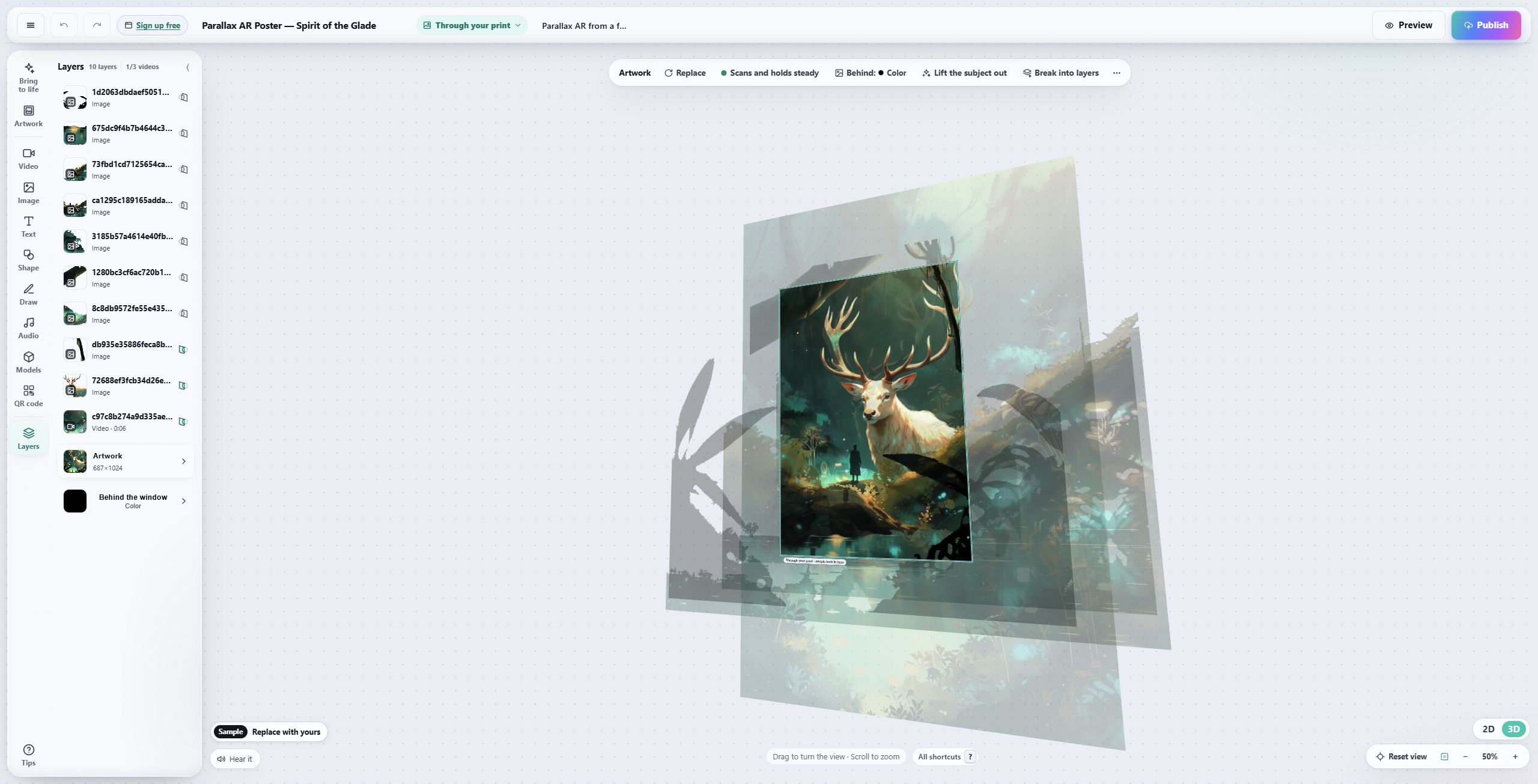
It is a layout canvas, not a scene graph.
Layers, a properties panel, drag to move, and the artwork pinned underneath as the anchor. If you have made a slide, you have used this before.
When you do still want a developer.
No-code has edges, and pretending otherwise wastes your afternoon rather than ours.
Scoring, physics and multiplayer need application logic beyond a visual composition. Choose a development tool or SDK that supports the particular interaction you need.
Placing a building on a street, or anything anchored to a face rather than a printed image, is a different technology from image tracking. This is not that.
If the experience has to live inside an app you already ship, you want an SDK. What we publish is a URL, which is a strength right up until it is not what you need.
Open a template, make it yours.
Interart’s AR templates are finished, working designs — open one in the browser editor, swap in your own artwork, and it’s yours. Each one teaches a technique with a built-in guided tour.
No account needed — sign up later and your work comes with you.
Put it on a phone this afternoon.
Start from a photo of the printed piece — the first reveal takes minutes.
Questions, answered.
No-code AR is augmented reality built in a visual editor rather than a game engine. You upload a photo of a printed piece, arrange video, image and text layers on it, and publish; the platform handles tracking, hosting and delivery. Nothing is compiled, and the viewer opens a link in a browser instead of installing an app.
Not for AR on a printed piece. Unity is a game engine and Blender is a 3D modeling tool. They are useful for custom applications or bespoke 3D assets. Putting video and text on a poster, a card or packaging needs neither.
It depends on the experience. Interart supports composing digital layers around artwork and sharing a hosted viewer. Custom game rules, face effects, location-aware campaigns and integration inside your own app can require different tools or development work.
No. The experience runs in the phone browser that is already on the device — iOS Safari or Android Chrome. Viewers scan the QR code printed beside the piece and point the camera at it. Browser viewing still depends on hosting, media availability and support for the viewer’s device.
Yes. When publishing the changes, choose to update the existing published link. Retest the same printed QR code before distributing more copies. Publishing a separate design does not automatically change the one your audience already has.
Nothing. The free plan covers 3 published designs and 100 scans a month with commercial use included and no credit card, and the editor opens without an account — you are asked for one at publish. Pro is $18/month for 10,000 scans a month and unlimited designs.