WebAR for artists: augmented reality art, right in the browser.
Create augmented reality art with Interart in your browser. Add video, images, text and 3D to a photo of your print, then share a link or QR code. Viewers point their phone at the artwork to see it come alive in the browser, or use the optional Interart iPhone app. Free to start; commercial use on every plan.

No account needed.
- View in the browser · app optional
- One link or QR to share
- Video, text and 3D on real artwork
Real capture — an original artwork playing in the browser
How does WebAR for art work?
Image tracking. The artwork itself is the marker: the tracker learns the print from a photo, finds it in the camera feed, and pins your layers to it in real time — even as the phone or the piece moves. Camera frames are processed on the viewer's device and never uploaded. Because it all runs on web standards, the same link works on iOS Safari and Android Chrome with nothing to install.
No QR printed on the art, no fiducials — the piece's own detail is what the tracker locks onto. The QR code lives beside the work, not on it.
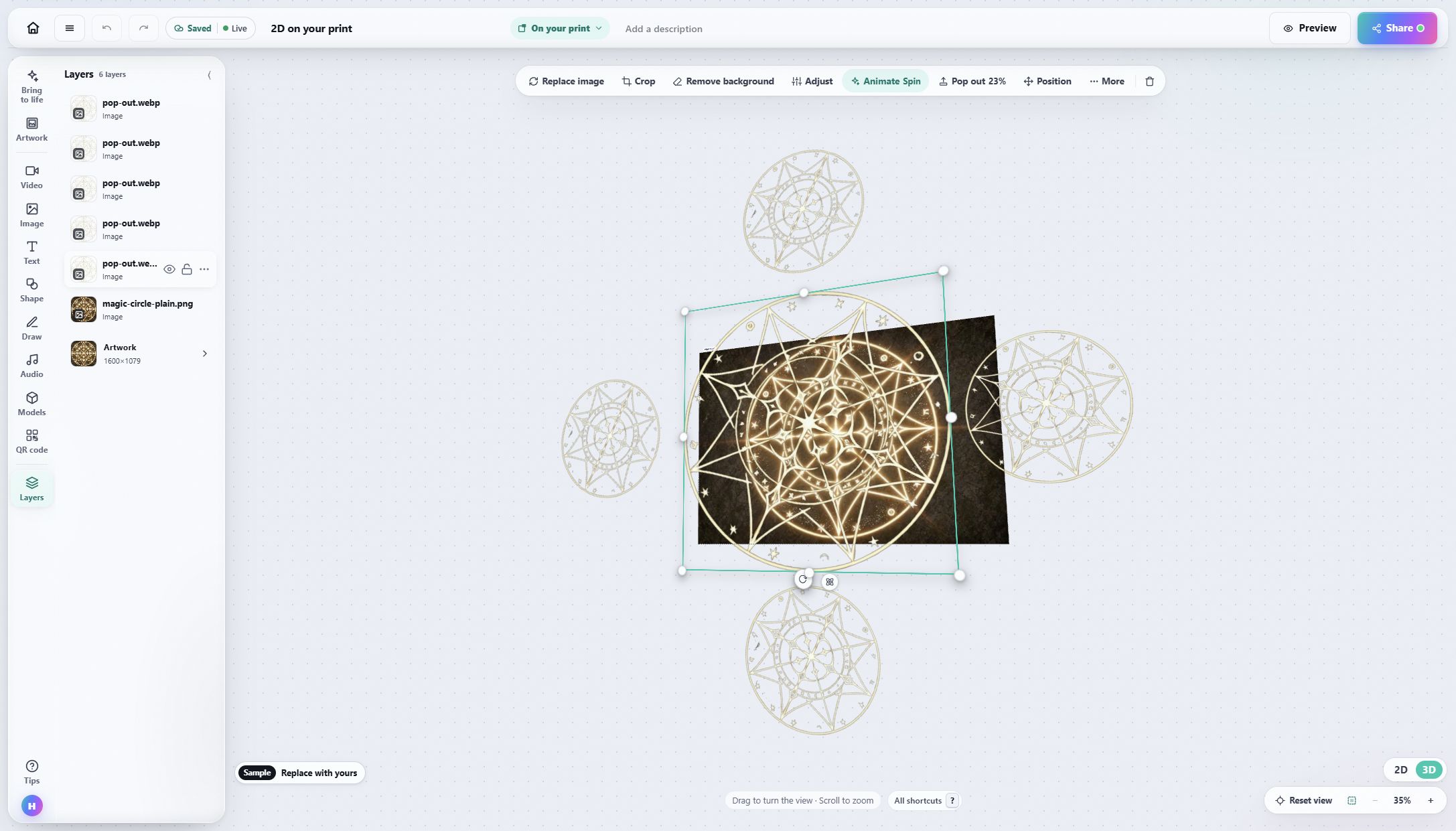
Elements can float outside the artwork's edges — titles above a canvas, characters stepping out of a poster, lore hanging beside a card.
Swap the video or fix a typo after the print run — republish, and every existing QR code and link shows the new version.
Compose the reveal like a design tool, not a game engine.
The editor is drag-and-drop: your artwork photo is the anchor, and every layer sits exactly where it will appear in AR.
How do you make WebAR art? Three steps.
-
1
Photograph your artwork
Upload a clear photo of the print. Shot it at an angle? Mark the four corners and it's flattened for tracking.
-
2
Compose the reveal
Stack video, images, GIFs, text and 3D in the editor. Layers can float beyond the artwork's edges.
-
3
Publish and share one link
You get a link and a QR code. Viewers open it in their phone browser and point at the piece. No account is needed to view; the Interart iPhone app is optional.
Follow the step-by-step guide to making your art come alive with AR, or make a painting move when someone scans it with an AI video tool.
What artists make with it
Gig posters, exhibition posters and prints that play their story when scanned. Create an AR poster →
Custom and hand-painted cards with full-motion art, stats and lore floating beside the physical card.
A QR beside the wall label turns any hung work into a moving piece — visitors use their own phones, no gallery hardware.
Editions where every copy carries the same living layer — the AR travels with each print sold.
Browser viewing vs required app installation
| Interart (app optional) | Platforms requiring an app | |
|---|---|---|
| Viewer setup | Open a link in the browser, or choose the Interart iPhone app | Install the required app before viewing |
| Works on | iOS Safari and Android Chrome; optional iPhone app | Only devices with the app installed |
| Sharing | One URL / QR per piece | App installation plus the platform’s artwork-opening flow |
| Long-term availability | Depends on hosting, media, and browser or app support | Depends on the app, hosting and ongoing platform support |
Looking at a specific tool? See Interart vs Artivive or the Artivive alternative breakdown. Curious how the tracking actually works? The plain-language explainer · QR codes vs image tracking · Keeping AR art alive when platforms die.
Questions, answered.
WebAR (web-based augmented reality) plays an AR experience directly in the browser — no app install. For art, that means digital layers (video, images, text, 3D) anchored to a physical piece: a viewer opens a link or QR code on their phone, points the camera at the artwork, and watches it come alive.
No. Viewers can open your link or scan your QR code in iOS Safari or Android Chrome, allow camera access, and point at the artwork. No account is needed to view. Interart also offers an optional iPhone app, available on the App Store.
Interart Free includes 3 published designs and 100 scans a month, with no credit card and commercial use included. Pro is $18/month or $173/year for unlimited designs and 10,000 scans a month. Pro uses a small badge. Studio is $49/month or $470/year for unlimited designs and 100,000 scans, with no watermark or badge.
Every plan comes with a monthly scan allowance and there is never an overage charge. Reach yours and your artwork waits for the 1st — or upgrade and it is live again instantly. Nothing you have published is ever removed.
Open a template, make it yours.
Interart’s AR templates are finished, working designs — open one in the browser editor, swap in your own artwork, and it’s yours. Each one teaches a technique with a built-in guided tour.
No account needed — sign up later and your work comes with you.
Ready to bring yours to life?
Start from a photo of your art — the first reveal takes minutes.