Make a painting move when someone scans it.
To make a painting move when someone scans it, play a short video of that same painting exactly over it in the phone's camera view: that is augmented reality (AR). Make the clip with an AI image-to-video tool or your own footage, lay it over a photo of the painting in Interart, publish, and hang the QR code beside it. Viewers need no app, and the free plan includes 100 scans a month.
The numbers that matter.
- 30 seconds of video on the free plan Up to 20 MB a clip. A 5- to 10-second loop fits easily.
- 100 free scans, every month Resets on the 1st. At the cap a design pauses; nothing is billed.
- 0 apps for viewers to install It plays in the phone's browser.
- $0 to make and publish No card. An Interart watermark sits behind the AR, never on the painting.
Every limit is on the price list.
Three steps to a painting that moves.
-
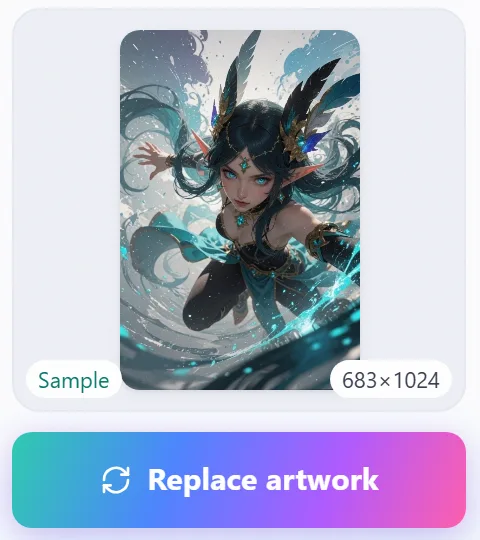
1Photograph the painting
Shoot it straight on and upload it as the artwork. Give the same photo to your video tool.
-
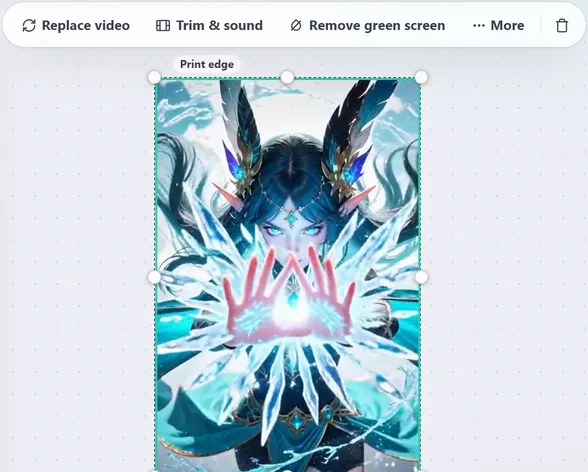
2Animate it and lay the clip over it
Make a short clip that starts on the painting, then place it exactly over the artwork.
-
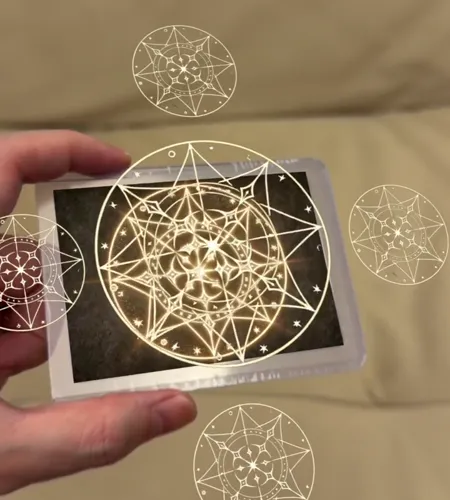
3Publish and scan
Hang the QR code beside the painting. A phone scans it, points at the painting, and it moves.
Three ways to make it move.
Give the tool your photo of the painting and describe the motion: drifting clouds, rippling water, a turning head. Kling and Luma both offer it (checked 17 October 2026). Check the tool's terms before you sell what it makes.
A time-lapse of the painting being made, a stop-motion of its parts, or an animation you drew. A process video over the finished piece is the classic reveal.
“Break into layers” splits the artwork into depth layers that shift as the phone moves, and “Animate” sets a cut-out part floating or swaying. The free plan includes 3 uses of “Break into layers” a month.
Make the clip line up with the painting
- Start on the painting itself. Generate the clip from the same photo you upload as the artwork, so its first frame is the painting and the change is seamless.
- Keep the camera still. Ask for a static camera. If the clip zooms or pans, its edges drift off the painting's edges.
- Match the proportions. Crop the clip to the painting's shape so it covers the artwork exactly, without stretching.
- Make it loop. A clip whose last frame comes back close to its first repeats without a jump.
- Do not rely on sound. Phones often start muted, so the motion has to carry the idea.
Why a QR code alone is not enough
A QR code on its own opens a video on a separate screen, and the painting stays still. To make the painting itself appear to move, the video has to play over the painting in the camera view and stay there as the phone moves. That is what Interart's viewer does once the code has opened it: the code is the way in, and the camera then recognizes the painting.
When an AI video alone is the better answer
If you only want a moving version of the painting to post online, an AI video tool is all you need. AR adds the physical painting: someone standing in front of it, or holding the print, sees it move on their own phone. Read more on when AR adds more than a video, and follow the full guide to making your art come alive for printing and testing.
Open a template, make it yours.
Interart’s AR templates are finished, working designs — open one in the browser editor, swap in your own artwork, and it’s yours. Each one teaches a technique with a built-in guided tour.
No account needed — sign up later and your work comes with you.
Put your painting in motion.
Start from the video template, then replace its clip with yours.
Questions, answered.
On the phone's screen, yes. The painting on the wall does not change: the camera view shows a moving version of it laid exactly over it, held in place as the phone moves. Anyone without the phone sees the still painting.
None. They scan the QR code with the phone camera, allow the camera in the browser and point the phone at the painting. It works on iPhone and Android.
Yes. An AI image-to-video tool turns a still photo into a short clip from a written description of the motion. Upload the same photo to Interart as the artwork, so the clip starts exactly on the painting.
Up to 30 seconds and 20 MB per video on the free plan, and 3 minutes on Pro. MP4, MOV and WebM all work. A loop of 5 to 10 seconds is plenty for most paintings.
No. Hang it beside the painting, on its label or on a card. The code only opens the viewer; the camera then recognizes the painting itself.
Nothing to start: the free plan publishes 3 designs with 100 scans a month and commercial use, and shows an Interart watermark behind the AR, never on the painting. Pro is $18 a month for 10,000 scans and unlimited designs, with a small “Made with” badge instead of the watermark. At the monthly cap a design pauses until the 1st; nothing is billed.