Your artwork can hold another story.
Augmented reality art adds digital layers to a physical piece. Through a phone camera, a print can move, a painting can reveal its process, and an illustration can gain depth. The original artwork stays part of the experience.
A flat illustration becomes a scene with depth.
This forest artwork is a product demonstration built in the Interart editor. Separate foreground and background layers create a different view as the camera moves.
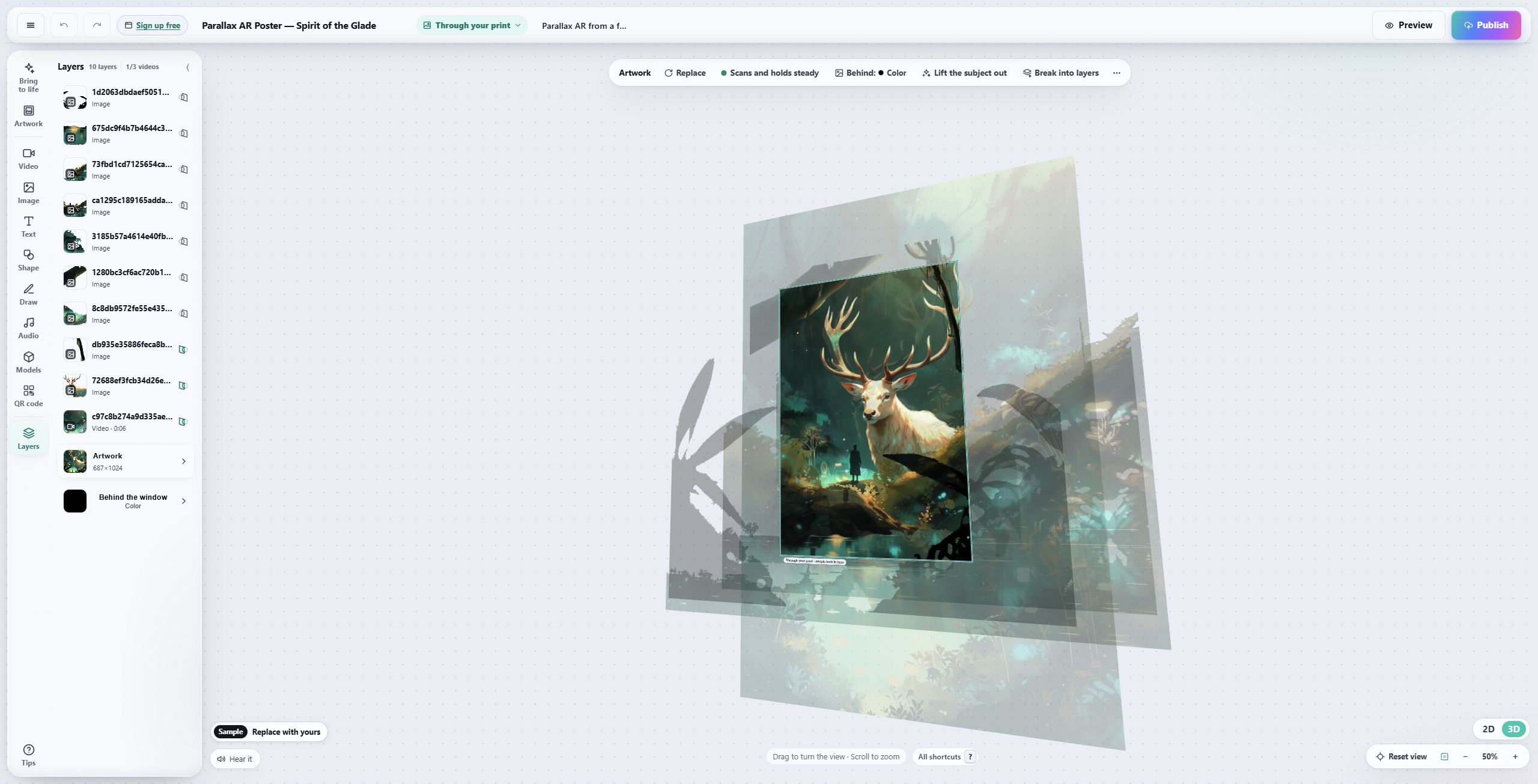
See the layers move in the editor preview.
See a phone-camera capture and more techniques in AR art examples.
Motion, context or a new point of view.
Let smoke drift out of a chimney or a character turn toward the viewer. A short loop can extend an illustration without covering the composition.
Show the sketch beneath the finished painting, a printmaking sequence or a short artist introduction. The viewer can connect the explanation to the work in front of them.
Separate a foreground from its background, place text beside a print or let a 3D element reach beyond the frame. Movement around the piece becomes part of looking.
To set the painting itself in motion, see how to make a painting move when someone scans it.
What makes AR art different from a video?
A video can tell the story on its own. AR connects that story to the object and the viewer's position. The camera shows the real print, its surroundings and the digital layer together. That connection is the reason to use AR; motion alone is not enough.
Use a normal video when you simply want someone to watch a film or hear an explanation. Choose AR when recognizing, approaching or moving around the artwork adds something. A recorded AR reveal can also become a social post that shows what the physical piece does. Read when AR adds more than a video.
Where can you use it?
- Art prints and editions: a moving layer that travels with the print.
- Museums, galleries and exhibitions: context beside work already on the wall.
- Posters and trading cards: a reveal around something people already collect or display.
- Packaging and event campaigns: a reason to look more closely at a printed surface.
How to make augmented reality art
-
1
Choose the physical artwork
Use a clear image of the piece your audience will see. Varied detail spread across the image gives the camera more to recognize than a plain background or repeated pattern.
-
2
Add the reveal
Open a template in Interart, replace the artwork and arrange your video, images, text, sound or 3D. Keep the first version focused on one idea.
-
3
Publish and test on a phone
Share the viewer link or its QR code. People open it, allow the camera and point at the artwork. Test the actual print and viewing conditions before sharing widely.
Follow the complete first-artwork walkthrough, including print setup and troubleshooting.
Open a template, make it yours.
Interart’s AR templates are finished, working designs — open one in the browser editor, swap in your own artwork, and it’s yours. Each one teaches a technique with a built-in guided tour.
No account needed — sign up later and your work comes with you.
Give one piece a second look.
Start with a working example and make it your own.
Questions, answered.
Augmented reality art combines a physical artwork with digital content seen through a camera. The digital layer can include motion, sound, text or 3D, positioned in relation to the original piece.
Interart lets you create in a browser and share a browser viewer. Viewers open your link or QR code, allow camera access and point at the artwork. An app is optional. Other platforms may require an app or reserve browser viewing for particular plans.
You can start editing in Interart without an account. A free account is required to publish; it includes 3 published designs and 100 scans a month, with commercial use included. See the pricing page for media limits and branding.
Detailed, varied images usually work better than blank areas, repeated patterns or reflective surfaces. Test your actual print at its intended size and distance. A QR code opens the experience; the artwork supplies the detail used to track it.