See what another dimension can add.
These Interart product demonstrations show two ways to extend a physical artwork: motion that reaches beyond its edges and depth that changes with your viewpoint. Each shows a technique you can use with your own work.
Product demonstrations by Interart · Updated
1. Motion around a real print
In this phone-camera recording, glowing circular elements sit over and around a small print. The physical card stays in the camera view. The scene uses the artwork as its reference while the digital composition extends beyond the paper.
Use the technique for: a small accent around a print, an animated border or a reveal that deliberately crosses the frame. Keep enough of the artwork visible that the viewer can appreciate the relationship.
Start simply: add one video or image layer, place it relative to your target and test the edge of the composition on a phone. A short, clear loop is easier to evaluate than several effects competing at once.
A forest scene becomes a layered composition.
This editor screenshot shows the artwork split into separate layers. The foreground can sit closer to the viewer while the background recedes. The clip below is an editor preview, not a camera recording.
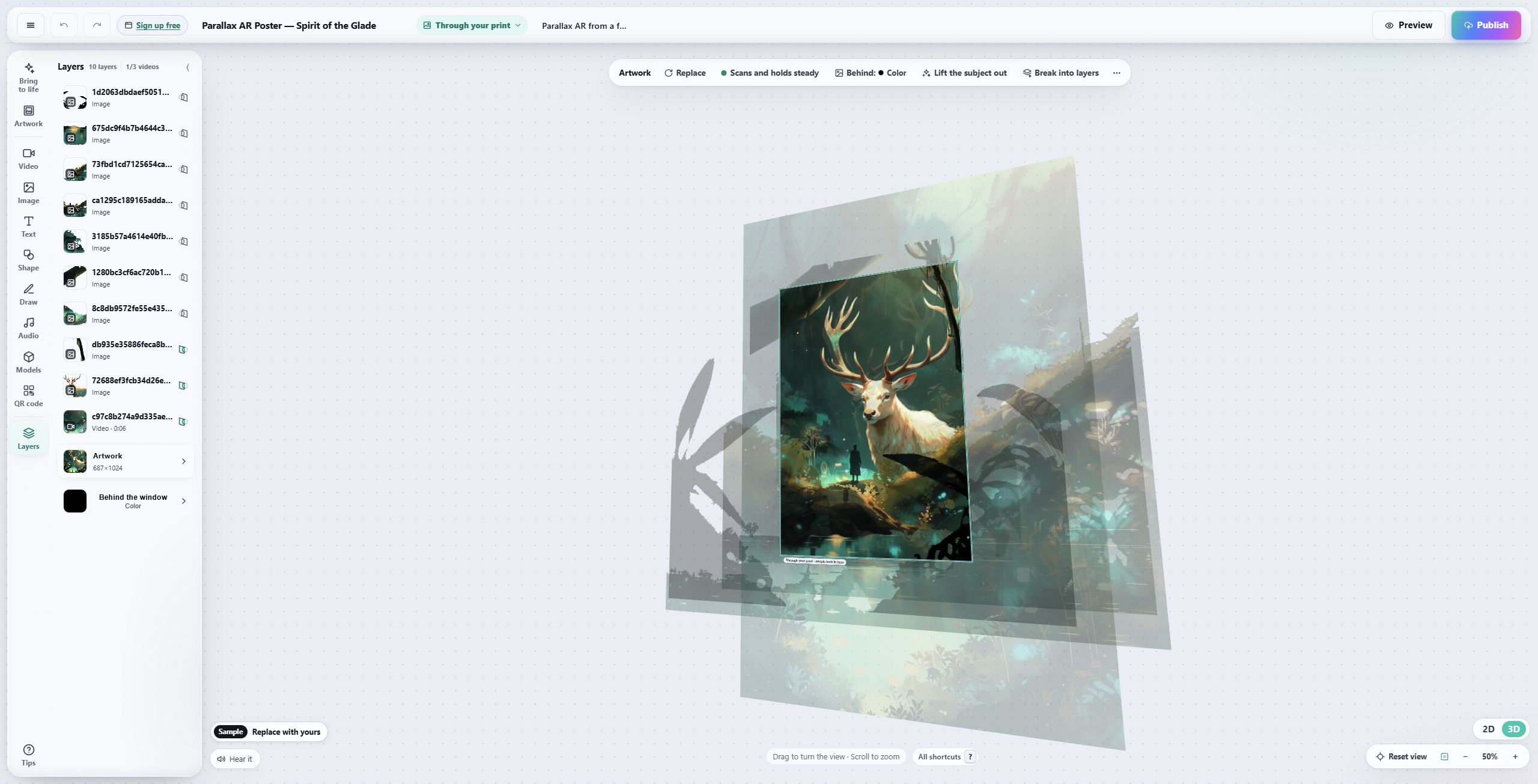
Moving the viewpoint reveals the gaps between layers.
Use this for a composition with a clear foreground and background. Start with the depth template in the template gallery, then test your own image.
Choose the effect around the artwork.
Connect the print to an animation or a making-of clip. The buyer still owns and displays a complete physical piece.
Let an artist voice, a sequence of studies or translated text appear beside the work. Make the viewing invitation visible on the wall label.
Compose an effect that reads clearly in the camera view, then leave room for the person and the setting. Test whether the resulting recording communicates the idea without explanation.
These are possible applications, not customer results. Plan a gallery experience or an event campaign around the audience you actually have.
Open a template, make it yours.
Interart’s AR templates are finished, working designs — open one in the browser editor, swap in your own artwork, and it’s yours. Each one teaches a technique with a built-in guided tour.
No account needed — sign up later and your work comes with you.
Make the next example yours.
Follow the first-artwork guide, then try one effect on your own print.